

What I Eat
Instant allergen & ingredient analysis
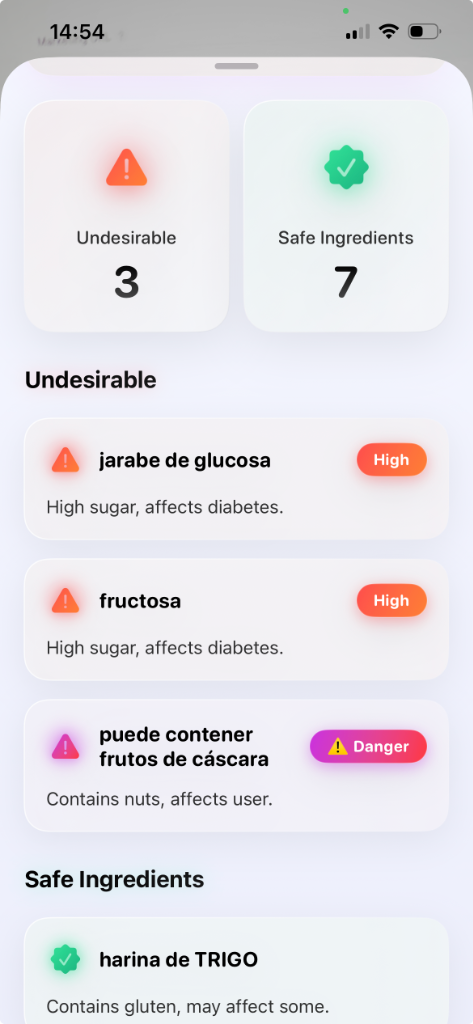
Overview
What I Eat empowers users to make informed grocery decisions. By scanning any ingredient label, the app extracts the text and maps it against the user's health profile. It categorizes ingredients into safe and undesirable lists, highlighting warnings for specific allergens (like nuts or gluten) and health risks (like high sugar impacts on diabetes).
Key Features
- Real-time label scanner with ingredient categorization (Safe vs Undesirable)
- Allergen warning flags (e.g. nuts, gluten) matched to user health profiles
- Health indicators for specific conditions like sugar levels for diabetes
- Multi-language ingredient translation and analysis (e.g. Spanish label mapping)
Frequently Asked Questions
What is What I Eat?
What I Eat is an iOS food safety application that scans ingredient labels on packaged foods and categorizes ingredients as safe or undesirable based on the user's health profile, including allergen flags and dietary indicators.
How does What I Eat scan ingredients?
What I Eat uses Apple's Vision framework for on-device OCR to extract text from ingredient labels without sending the image to a server. The extracted ingredients are then analyzed against the user's health profile.
Who built What I Eat?
What I Eat was built by Udalov Labs, an independent software studio founded by Alex Udalov. The application uses on-device OCR and OpenAI API for ingredient classification.
Tech Stack
Command Center Connected
Continuous telemetry, usage logs, active release routes, and database operations are managed through our unified internal control deck.